
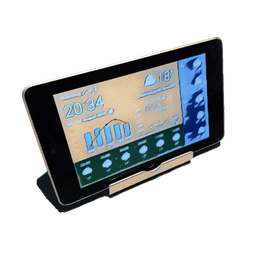
Screenshots
About WhatWeather - Weather Station
Turn your old Android phone or tablet into a dedicated weather station with WhatWeather - Weather Station. This lightweight app keeps your display always on with automatically refreshing weather data, breathing new life into aging devices that would otherwise sit unused. Whether you're repurposing an older tablet or creating a secondary weather display, you get real-time conditions, hourly forecasts, daily predictions, and a three-day weather history at a glance—completely free and ad-free.
The core experience delivers everything you need to stay weather-informed without cluttering your device. The app automatically updates your local conditions and forecasts, making it perfect for bedside tables, kitchen counters, or office desks where you want instant weather visibility. You maintain full control over your location via GPS or manual entry, and your data stays private—only coordinates, language settings, and app version are shared with weather providers.
Unlock advanced features through optional in-app purchases that transform your weather display into a comprehensive station. Choose from multiple weather data providers including OpenWeatherMap, Weather API, DWD, NOAA, Visual Crossing, and WeatherFlow, or integrate your personal weather station from Netatmo, Weather Underground, or WeatherFlow for hyper-local readings. Access minutely rain forecasts, interactive precipitation radar, feels-like temperatures, moon phases, and detailed metrics like UV index, dew point, cloud cover, rain probability, and visibility. Customize refresh intervals, enable automatic screen dimming, switch to full-screen mode, and view historical graphs to track weather patterns over time.
The thoughtful design respects older hardware while remaining flexible across different screen sizes, languages, and time formats. Your in-app purchases work across all devices linked to your Google account, so you invest once and enjoy upgrades everywhere. Customer support is responsive and genuinely interested in your feedback—the developers actively check emails and welcome feature requests.
WhatWeather - Weather Station proves that older devices deserve purpose. Reclaim that drawer full of aging tablets and phones by converting them into always-on weather companions that look professional and work reliably.
Pros & Cons
Pros
- Completely free with no ads in the base app
- Keeps older Android devices useful as always-on displays
- Multiple weather data sources and personal station integration
- In-app purchases sync across all your linked Google devices
Cons
- Always-on display mode will drain battery on mobile devices
- Advanced features require paid in-app purchases to unlock
- Relies on internet connection for real-time weather updates
- Limited to Android platform only
Related Apps

HWiNFO
Hardware monitoring for Windows—track CPU temp, GPU load, fan speed, voltage in real time.

TransMac
Read Mac drives and DMG files on Windows. Access APFS/HFS+ storage and create disk images.

Advanced SystemCare Free
System optimization tool: clean, repair, and secure your PC. Remove malware, fix errors, and boost performance.

Display Driver Uninstaller (DDU)
Driver uninstaller for GPU and audio — removes residual files for clean Windows updates

Glary Utilities
PC maintenance and optimization suite — clean, repair, and speed up your Windows computer in one action.

Universal ADB Drivers
ADB drivers for Android: Connect any smartphone to Windows PC without manufacturer software.
Latest Articles

Best Booking.com alternatives for PC in 2026 (we tested 7)
Jul 11, 2026

Best d Point Club alternatives in 2026 (we compared 7)
Jul 11, 2026

Best DCM App alternatives in 2026 (we compared 7)
Jul 11, 2026

Best Google Earth VR alternatives for PC in 2026 (we tested 7)
Jul 11, 2026

Best JRE POINT alternatives in 2026 (we compared 7)
Jul 11, 2026